TRACE / DRAWINGS + MODELS
Review DWG and IFC in your browser.
Bring drawing and model review into the same workspace as the questions, evidence and decisions they support.
DWG review inside the project.
Choose a current-project drawing and its exact version. The supported conversion path opens DWG content in TRACE’s internal CAD workspace for review. Original design files remain preserved.
In the 2D controller, select entities, search source handles, pan, zoom, fit, change visible layers, add notes and draw review polylines. Approximate XY measurement is available within the supported geometry and unit context.
REAL TRACE / EXISTING PROJECT DRAWING
See TRACE work on a real project plan.
Watch real clicks in TRACE: zoom and pan a grading plan, inspect source entities, control 3D and solid-surface views, and export selected XYZ coordinates.
Captured from the actual TRACE environment; edited for pace. City and project names are fictional: City of Riverton and Cedar Grove Park Improvements. The tablet segment uses a landscape tablet-sized browser. Surface preview and extracted coordinates require source and survey verification.
Read the video walkthrough
Open the existing drawing, zoom and pan, then click a polyline to reveal its source handle and layer. Use the source-Z range and orbit controls. Build a surface from the POINT-OFF layer; switch wireframe and shaded views with a clearly labeled 5× vertical display scale. Select three actual CAD POINT rows and export their original XYZ coordinates in feet. Finish with the same surface in a tablet-sized browser. The drawing conversion has coverage limits; CRS, datum and survey-control status remain unverified.
Extract survey-point coordinates from CAD.
Inspect original X, Y and Z values, distinguish actual POINT entities from block anchors and export selected coordinate rows. Keep the source drawing and version in context. Extracted points are unverified references until their units, datum, coordinate system and survey-control status are confirmed.
Source XYZ and surface previews.
The XYZ controller presents supported line and point geometry with orbit, pan, zoom, fit and explicit vertical-display controls. The coordinate controller lets a reviewer inspect original XYZ values, distinguish actual points from block anchors and export selected rows.
A solid-surface preview can be built from one actual POINT layer with low/high colors, points, wireframe and maximum-edge controls. This is a conceptual review surface; it does not certify final grading, survey control or design acceptance.
IFC model inspection and coordination.
Supported IFC/IFCZIP uploads provide real model-derived geometry and object information. Reviewers can search the object tree, select and isolate objects, fit the selected element, change standard views and apply X/Y/Z section cuts.
Supported coordination tools surface candidates for human review. Geometry and evidence remain bound to their source and version. Publication, issue handling and CAD provisional review follow their applicable permissions and workflows.
A practical review workflow.
- Open an authorized drawing or model at a known version.
- Use the appropriate 2D, XYZ or IFC inspection controls.
- Record a markup, observation or supported evidence link.
- Route the question into the accountable project workflow.
Coordinate published IFC models together.
Published IFC federation brings multiple reviewed models into one view with explicit placement transforms and retained source identity. Review model membership, visibility and coordination evidence together. Explore IFC federation and coordination controls →
Control the surface. Keep the source visible.
Choose one native POINT layer; inspect the blue-to-gold elevation legend, switch wireframe and source-point overlays, and apply a maximum edge length to filter gaps. TRACE reports duplicate, conflicting-coordinate and zero-Z exclusions alongside the triangle count.
Use a source-Z range and explicitly labeled vertical display scale in XYZ review. A selected actual POINT can carry an unverified reference marker. Print supported drawing, XYZ, surface and coordinate views with source identity and applied settings.
Review across supported devices.
Use the applicable TRACE client or supported Windows, Mac, iOS and Android browser workflow. CAD/BIM needs compatible graphics; connected services need network access. Installation and features depend on the applicable release, license and permissions.
Frequently asked questions
Can I review DWG without an external CAD application?
Yes, for the supported internal review functions and admitted source geometry. Unsupported entities or references can limit completeness.
Does TRACE change the original DWG or IFC?
Review annotations and checked derivatives are separate from the preserved source design.
Can I use the terrain view as an approved final grade?
No. The terrain path is a preview built from selected source points, with explicit limits and human review.
Connect the review to RFIs and project controls or explore source-linked intelligence assistance.
See how TRACE fits your team.
Explore the supported workflows, sources and account configuration in a focused demonstration. Book a working session or explore TRACE plans.
SEE IT IN TRACE
Open the screen. Follow the work.
See the TRACE workspace behind this capability, with its related navigation expanded and the project record in view.
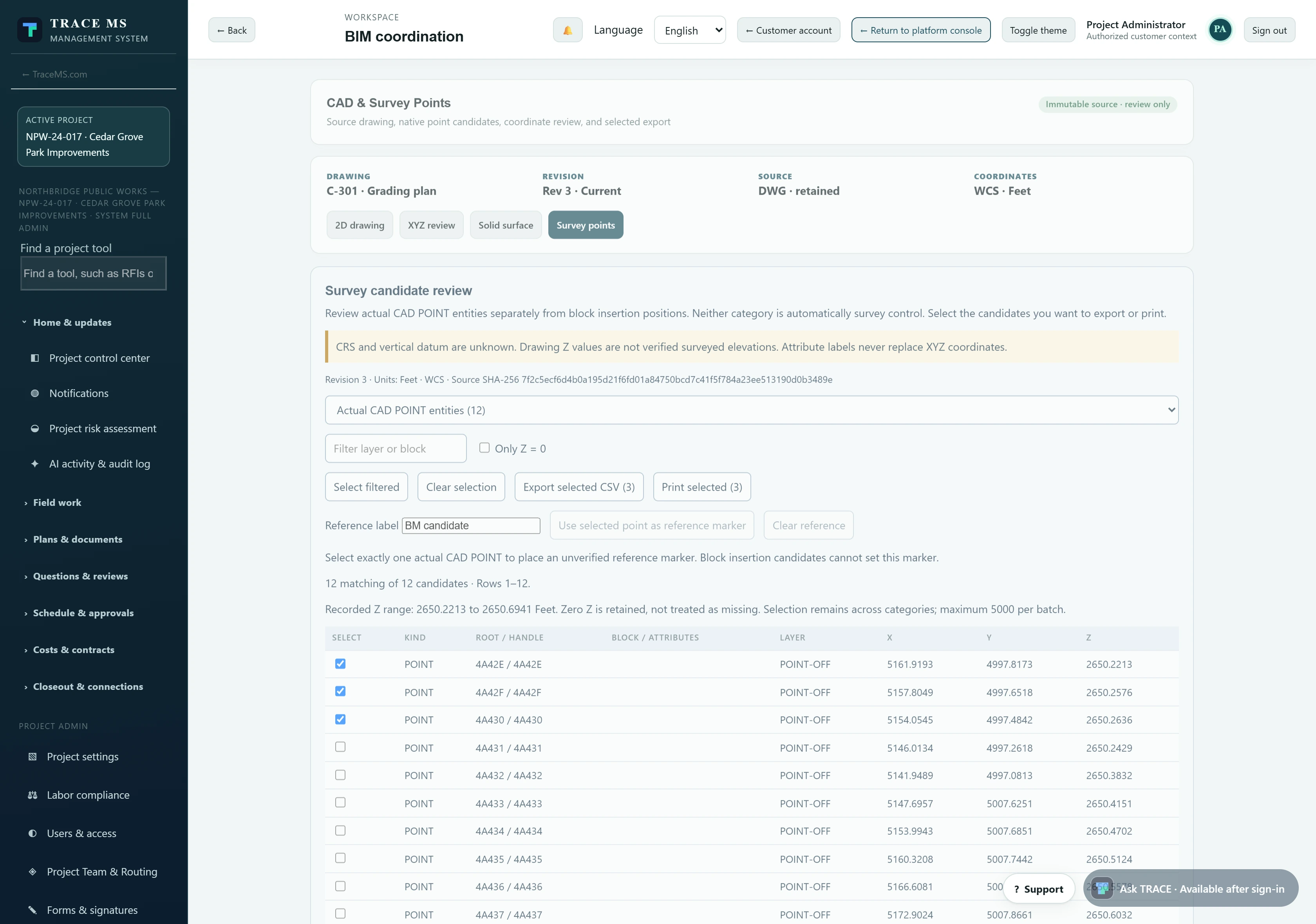
The survey-points screen is captured from the existing grading drawing in the TRACE walkthrough above. The IFC screen uses the Cedar Avenue Park Renewal sample project. Both scale to the device width.